
Smart heating doesn’t get much simpler than this: the SwitchBot Smart Radiator Thermostat puts app control right on your radiator. You set the temperature precisely from your phone or by voice and save energy along the way. We tested the thermostat in depth and show you what it can do and how it copes with everyday life.

Last updated on 2026-11-14 / affiliate links / images from the Amazon Product Advertising API. Prices shown may have changed since then. All information without guarantee. * = affiliate link: if you order a product through such a link, we receive a commission from the seller. There are no extra costs for you.
What’s in the box and design
The box contains everything you need to get started: the radiator thermostat itself, six adapters for the most common radiator valves (Danfoss RA, RAV and RAVL, M28×1.5, Giacomini and Caleffi), a user manual and two AA batteries. Valves with an M30×1.5 thread need no adapter at all. Everything is well packed and feels high quality.
Not sure which valve you have? Use the cardboard adapter template in the box. You can also check compatibility with your radiator on the SwitchBot product page.
The design is clean and modern. The compact white housing has a discreet display that only becomes visible when you turn the dial. That way the thermostat blends into any room without drawing attention to itself.
Setup guide: installing the SwitchBot radiator thermostat step by step
Fitting the thermostat takes no tools, and the SwitchBot app walks you through every step. This is how it went in our test, matched against SwitchBot’s official instructions.
Part 1: add the thermostat to the app
- Install the SwitchBot app from the App Store or Google Play, sign in and turn on Bluetooth on your phone.
- Tap the + icon on the home screen, choose Add Device and select the Radiator Thermostat. The app also finds it automatically in its Bluetooth scan.
- Open the battery cover by pressing gently on its edge and pulling it towards you, insert the two AA batteries, then press the cover down and slide it back to close it.
- Wait until IN appears on the display, then tap Connect Device in the app.
- Give the thermostat a name and assign it to a room, for example “Living room thermostat”.
- If the app offers a firmware update, install it straight away and keep your phone close to the thermostat while it runs.
Part 2: fit it to the radiator
- Open the old thermostat head fully (highest setting), then unscrew it and take it off the valve.
- Identify your valve type with the adapter template. On an M30×1.5 valve you don’t need an adapter.
- Push the matching adapter onto the valve so it sits flush.
- Place the SwitchBot thermostat on the adapter (or directly on the M30×1.5 valve) and tighten the metal nut by hand.
- Check that the part shown in the app has retracted into the thermostat. If it hasn’t, press the button on the device once. Then tap Installation complete.
- The thermostat now calibrates itself to the valve. Wait for it to finish, then set a temperature in the app as a quick function check.
- Optional: add a SwitchBot hub to control the thermostat remotely and connect it to Alexa, Google Home or Apple Home. Matter needs a Matter-enabled hub (Hub Mini Matter Enabled, Hub 2 or Hub 3).
Tip: If the thermostat comes loose on the valve, SwitchBot has a video guide for fitting the locking pin, along with installation videos for every adapter, in its Help Center. If “Er” appears on the display, the thermostat has been below 0 °C for too long. Let it warm up for a few minutes in a heated room.


The SwitchBot app: integration and features
Schedules and modes
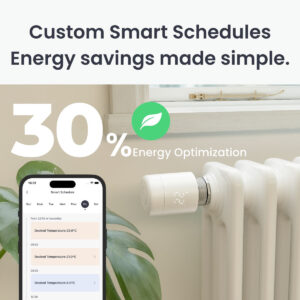
You can set up different schedules for each day. If you want to reuse one day’s settings on another day, simply copy them across at the bottom of the screen. Different settings per day work just as well.
Alongside the smart schedule, the app offers Manual, Comfort, Quick Heating and Eco modes. A manual change overrides the schedule until the next time block starts.
Open window detection
If the temperature drops by more than 6 °C within four minutes, the thermostat assumes a window is open. It shows “OP” on the display and closes the valve to avoid wasting energy.
Normal heating resumes once the temperature rises by 3 °C within four minutes, or after 48 minutes at the latest. For more reliable detection, SwitchBot recommends a Contact Sensor on the window in an automation. That requires a hub, and you should then switch off the built-in detection so the two don’t send conflicting commands.
App and voice control
The app gives you quick temperature changes, room overviews and scenes. With a SwitchBot hub you can also use voice commands via Alexa, Google Assistant or Siri Shortcuts, so you don’t need your phone at all. Push notifications can optionally keep you up to date on important status changes.
Geofencing and remote control
With a SwitchBot hub, the system switches to a lower temperature automatically when you leave and back to comfort mode when you return. You can check and adjust your radiators while you’re out, which is handy when plans change at short notice. Location features can be turned off at any time.
External temperature sensors
Paired with SwitchBot sensors, the thermostat regulates by the actual room temperature rather than the warm air right next to the radiator. That improves accuracy, especially in alcoves or behind curtains. A well-placed sensor prevents rooms from overheating or staying too cold.
Saving energy and frost protection
Setback periods, Eco mode and lower night-time temperatures noticeably cut consumption without sacrificing comfort. Built-in frost protection keeps your pipes safe automatically when temperatures get very low. The app also logs temperature readings, which helps you spot further savings.
Manual control and display
You can change the target temperature directly on the device with the dial, and the discreet display shows the current and target values clearly. A child lock prevents accidental changes, which is ideal if you have kids at home. The adjustable range is 5 to 35 °C.
Multiple rooms and zones
Several thermostats can be grouped into rooms so that one shared schedule applies per zone. Scenes link heating to other smart home actions, such as lighting or presence. That keeps control clear and simple, even in larger homes.
Calibration and valve protection
Automatic calibration sets the valve stroke precisely and compensates for mechanical tolerances. Regular automatic descaling movements stop the valve from seizing up after a long break, for example over the summer. If the resistance is unusually high, the app prompts you to check the installation.
Notifications and maintenance
Low battery, connection problems or open windows can all be shown as alerts. According to SwitchBot, one set of batteries lasts around ten months, so a whole heating season. We also recommend always installing firmware updates: they fix problems and can add new features to the app.


Last updated on 2026-11-14 / affiliate links / images from the Amazon Product Advertising API. Prices shown may have changed since then. All information without guarantee. * = affiliate link: if you order a product through such a link, we receive a commission from the seller. There are no extra costs for you.
Last updated on 2026-11-14 / affiliate links / images from the Amazon Product Advertising API. Prices shown may have changed since then. All information without guarantee. * = affiliate link: if you order a product through such a link, we receive a commission from the seller. There are no extra costs for you.
Pros of the SwitchBot Smart Radiator Thermostat
- Easy installation with several adapters and a quick setup in the app
- Good app control and broad smart home compatibility, including Matter, Alexa and Apple Home via a SwitchBot hub
- Solid build and good value for money, with features such as open window detection, child lock and frost protection
Cons of the SwitchBot Smart Radiator Thermostat
- Full automations and remote access need extra hardware such as the Hub Mini
- In our test, the target temperature could only be set in whole degrees (20 °C, 21 °C and so on, no 20.5 °C)
Alternative radiator thermostats
The following radiator thermostats come from other manufacturers. You’ll find more models in our comparison of the best smart radiator thermostats and in our radiator thermostat product overview.

Last updated on 2026-11-14 / affiliate links / images from the Amazon Product Advertising API. Prices shown may have changed since then. All information without guarantee. * = affiliate link: if you order a product through such a link, we receive a commission from the seller. There are no extra costs for you.

Last updated on 2026-11-13 / affiliate links / images from the Amazon Product Advertising API. Prices shown may have changed since then. All information without guarantee. * = affiliate link: if you order a product through such a link, we receive a commission from the seller. There are no extra costs for you.

Last updated on 2026-11-14 / affiliate links / images from the Amazon Product Advertising API. Prices shown may have changed since then. All information without guarantee. * = affiliate link: if you order a product through such a link, we receive a commission from the seller. There are no extra costs for you.
If you use a FRITZ!Box router, the FRITZ!DECT 302 is another option. Meross also offers a Matter radiator thermostat starter kit.
Verdict
The SwitchBot thermostat is a smart starting point without the frills: quick to fit, pleasantly quiet and intuitive in the app. That’s exactly what counts day to day. Combined with a hub or the Home Climate Panel, it really comes into its own in a smart home, with Matter support and useful automations. If you want more later, you can expand step by step without switching ecosystems.
Our criticisms are the coarse temperature steps and occasional delays in communication between the panel and the thermostat. We expect SwitchBot to iron these out with future updates.
All in all, SwitchBot delivers a solid, good-value package for rented flats and older homes that brings a noticeable boost in comfort with very little effort.
Last updated on 2026-11-14 / affiliate links / images from the Amazon Product Advertising API. Prices shown may have changed since then. All information without guarantee. * = affiliate link: if you order a product through such a link, we receive a commission from the seller. There are no extra costs for you.
What do you think of the SwitchBot Smart Radiator Thermostat? Let us know in the comments.
Photo gallery


Related: The best smart radiator thermostats compared