KNX has been on the market for more than 30 years, yet for many people it is just a word on an electrician’s quote. Unlike Wi-Fi plugs or Zigbee bulbs, KNX is not a wireless standard you add later. It is a building bus: a dedicated control cable that is run through the whole house while it is being built. Here we explain how KNX works, what you need and who it is worth it for.
What is KNX?
KNX is an open standard for building automation. Its specifications are public and no single company controls it. KNX has been a European standard (EN 50090) since 2003 and an international standard (ISO/IEC 14543-3) since 2006.
KNX was created in May 1999 from three older systems: the European Installation Bus EIB, BatiBUS and EHS. The organisations behind them merged into today’s KNX Association, a non-profit association based in Diegem near Brussels. The EIB roots go back even further: the first ETS software appeared in 1993.
According to the KNX Association there are now more than 8,000 certified products from over 500 manufacturers, including Gira, JUNG, Siemens, Hager and MDT. Because they all use the same standard, devices from different brands can be mixed in one installation.
How KNX works
One cable for data and power
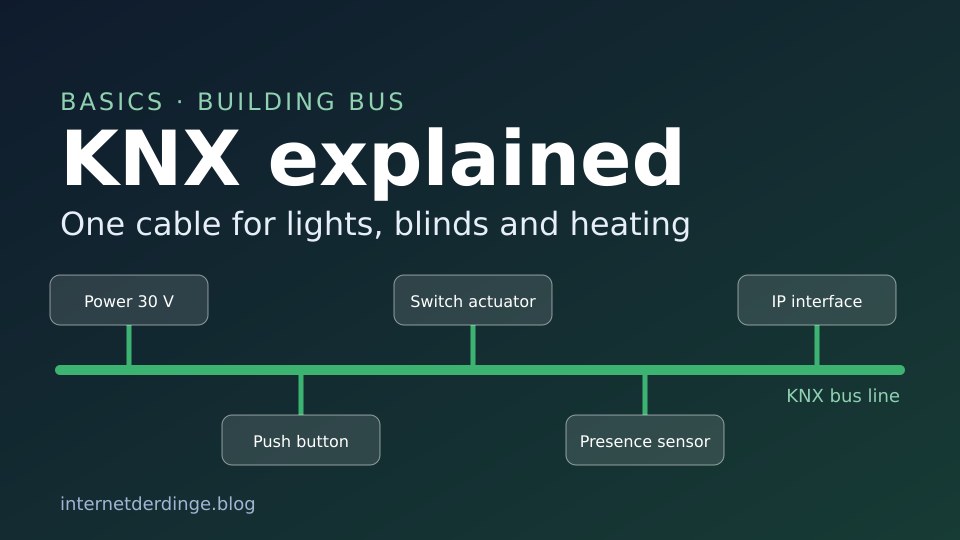
The heart of classic KNX is the green bus cable, usually of type J-Y(St)Y 2x2x0.8. It has two pairs of wires, and one pair is enough for the bus. That pair carries both the data (telegrams) and the power for the bus devices.
The bus voltage comes from a dedicated KNX power supply in the distribution board, typically 30 V DC. This is safety extra-low voltage (SELV), so the bus cable needs no special protective measures when it is laid. Minimum distances to the regular mains cables still apply. The cable can be routed freely and branched at any point.
Sensors and actuators
Two main types of device sit on the bus:
- Sensors detect something, such as a button press, movement or the room temperature, and send a telegram onto the bus.
- Actuators receive telegrams and act on them: they switch and dim lights, move blinds or control the heating.
On top of that there are system devices such as the power supply, line couplers and interfaces for programming.
No central controller needed
One key difference from many smart home systems: KNX needs no central server. Every device has its own microprocessor, so the “intelligence” is spread across all devices. If one device fails, the rest keep working. Core functions run locally, without the cloud or an internet connection.
Addresses and group addresses
During commissioning every device gets its own individual address in the format area.line.device, for example 1.1.5. To assign it, you press the programming button on the device.
What works with what is defined by group addresses. They link a push button to the matching switch actuator without any extra wiring, which is why people talk about “virtual wiring”. The default is a three-level structure such as 1/0/1, for example main group lighting, middle group ground floor, sub group kitchen.
Lines and areas
The smallest unit is the line segment with up to 64 devices. With newer devices built to the TP1-256 standard, up to 256 devices fit on one line, although in practice the power draw of the devices, and therefore the power supply, sets the limit. Line couplers join up to 15 lines into an area, and up to 15 areas can be connected.
Cable, radio or IP: the KNX media
| Medium | Used for |
|---|---|
| KNX TP (twisted pair) | Dedicated bus cable, the most widely used medium, ideal for new builds and major renovations |
| KNX RF | Sub-GHz radio for retrofitting without new cables, can be combined with TP via media couplers |
| KNX IP (KNXnet/IP) | KNX telegrams over the network: linking lines, remote access, programming |
| KNX IoT | Newer IPv6-based extension over Ethernet, Wi-Fi or Thread |
| Powerline | Part of the standard (mains wiring as the medium), but no longer features in the KNX Association’s current communication |
Programming with ETS
KNX is set up with ETS (Engineering Tool Software) from the KNX Association. It is manufacturer-independent: you use it to configure every certified device from every brand, assign addresses and link group addresses. ETS runs on Windows only. The current version is ETS6, version 6.4.1. Support for ETS5 ended at the end of 2025.
Licences depend on the size of the project. Editions as listed in the official KNX shop (as of 15 November 2026), where you will also find the current prices:
| ETS6 Demo | free, up to 5 products per project |
|---|---|
| ETS6 Lite | any number of projects with up to 20 devices each |
| ETS6 Home | one project with up to 64 devices, intended for homeowners running their own project |
| ETS6 Professional | no limits |
For trying things out there is also KNX Virtual, a free simulator for KNX installations.
To connect your PC to the bus you need an interface, for example a KNX IP interface connected to your home network. A simple example is the IP interface from Gira:


Last updated on 2026-11-15 / affiliate links / images from the Amazon Product Advertising API. Prices shown may have changed since then. All information without guarantee. * = affiliate link: if you order a product through such a link, we receive a commission from the seller. There are no extra costs for you.
KNX without ETS
Some manufacturers offer their own, simpler routes. With Gira One, commissioning is done entirely with the free Gira Project Assistant (GPA), and according to Gira there are no ETS costs. Hager KNX easy is set up with the Hager Pilot app and supports up to 255 wired and 255 wireless devices. Both routes tie you to the respective manufacturer, though. There is no cross-brand way to configure KNX without ETS.
How secure is KNX?
Since 2015 there has been KNX Secure, made up of two parts: KNX IP Secure fully encrypts all telegrams on the IP network, and KNX Data Secure protects the user data on the bus with encryption and authentication. Encryption uses AES-128 (CCM) and is standardised in EN 50090-3-4.
The KNX Association also recommends using only a VPN for remote access over the internet and separating the KNX IP network from the rest of the home network with a VLAN or firewall. For wireless installations it recommends KNX Secure.
KNX and Matter, Alexa, Apple Home
KNX sees itself as the permanent backbone of the home. In its position paper on Matter, the KNX Association describes Matter as an addition for devices you buy rather than install, such as lamps, plugs, TVs or household appliances. Since Light + Building 2024, manufacturers have offered the first gateways from KNX to Matter. There is no official Matter bridge from the KNX Association itself. Alexa, Google Assistant and Apple Home can also be connected via gateways.
With KNX IoT, the KNX Association is extending the standard towards IPv6, including over Thread and Wi-Fi. These devices run in the same installation as classic KNX and are also set up with ETS. A KNX IoT router is required.
Pros and cons
What speaks for KNX:
- Manufacturer-independent: certified devices from many brands work together.
- Long-lasting: new KNX devices are backwards compatible, installations have been running for decades, and ETS6 opens projects from all earlier versions.
- Fail-safe and local: no central controller, no cloud requirement.
- Standardised as EN 50090 and ISO/IEC 14543-3.
- One tool for all brands: ETS.
What you should know:
- KNX TP has to be planned: the bus cable goes into the walls during a new build or a major renovation. Afterwards, KNX RF is usually the only option.
- A specialist company usually plans and programs the installation. That costs more up front than retrofit smart home gear, but according to the KNX Association it offers more possibilities in the long run.
- ETS is a paid licence, priced by project size, and runs on Windows only.
- The simpler routes without ETS tie you to one manufacturer.
Who is KNX worth it for?
KNX is most interesting when you are building new or doing a full renovation anyway. Then the bus cable can be planned in, and the house gets a foundation for lighting, blinds, heating and sensors that does not depend on one vendor’s server or app. Without new cables, the only KNX option is radio via KNX RF. For individual retrofit devices there are also wireless standards such as Matter, Zigbee and Thread.
Another system that is permanently installed in the house is Loxone with its Miniserver. All our articles on the topic are in our KNX & Loxone section.