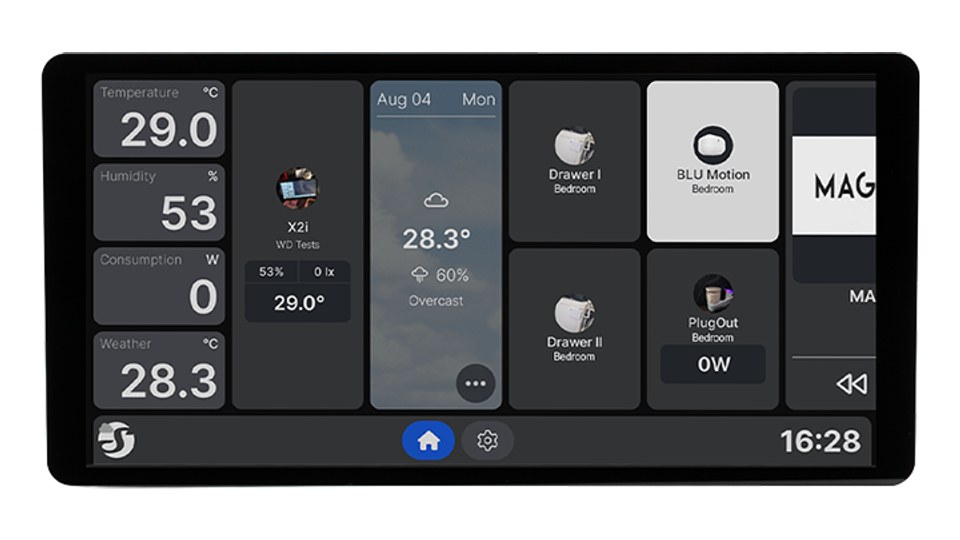
Shelly has released firmware 2.8.5 for its wall displays. It closes four security holes: logs, crash reports, the live log and files from the media library could previously be accessed without the device password. Version 2.8.4 from October had already fixed three other flaws.
If you have a Shelly Wall Display on your wall, install the update and set a device password. Out of the box, local access is not protected at all.

Last updated on 2026-11-16 / affiliate links / images from the Amazon Product Advertising API. Prices shown may have changed since then. All information without guarantee. * = affiliate link: if you order a product through such a link, we receive a commission from the seller. There are no extra costs for you.
What 2.8.5 fixes
According to Shelly’s changelog, the release fixes four problems:
- Logs and crash reports could be downloaded without the device password.
- The logs contained more information than necessary. Shelly does not say which data.
- The live log could be viewed without the device password.
- Files from the media library could be downloaded without the device password.
The changelog does not say who reported the issues or which versions were affected.
New: security updates via the recovery system
From 2.8.5 the display can also install security updates through the Android recovery system. It looks for them together with regular software updates and keeps offering them until they are installed. According to Shelly, the first of these updates follows directly after 2.8.5.
The display now also checks for enough free storage before downloading. On the newer models, WebView can be installed, updated and switched via the app store (Google WebView or Android WebView). Shelly recommends installing 2.8.5 first and only then a WebView from the store.
Three bug fixes round it off: Matter could not be enabled after “Uninstall all updates” and restoring a backup from newer firmware, the display sometimes lost its connection to the Shelly Cloud, and the screen could freeze while pairing a Bluetooth sensor.
2.8.4 was already a security update
The previous version from 19 October closed three holes that, according to Shelly, were reported by an independent security researcher:
- A crafted backup file could give an attacker control of the display.
- Restoring a backup could change settings that are not part of the backup.
- The display did not verify that it was really connecting to genuine Shelly servers.
In addition, a web page opened on another device in the same network could read data from the display. That has been fixed since 2.8.4 as well.
Set a device password
The display’s local interface uses digest authentication with SHA-256. According to Shelly it is not active by default, only once you set a device password. After that, every request except basic device info requires a login. In the web interface you will find the setting under “Authentication”.
The holes fixed in 2.8.5 affected exactly the areas that stayed open even with a password set. Without a password, local access is open anyway. In its security document, Shelly says it aims to ship security hotfixes within three days of confirming an issue.
Which displays are affected
Shelly splits its wall displays into two groups. The newer models with Android 11 or later are the Wall Display XL, X2i, X1i, U1 and D1. The older models with Android 7 are the original Wall Display and the Wall Display X2.
According to Shelly, the older devices will stop receiving updates at some point, but there is no date yet. After an update they take longer to start because they clear their cache. Shelly asks users not to cut the power during that time.
The updates at a glance
| Firmware | Shelly Wall Display 2.8.5 (stable) |
|---|---|
| Released | 11 November 2026 |
| Security fixes | 4 (logs and crash reports, log content, live log, media library) |
| New | security updates via Android recovery, storage check before download, selectable WebView (newer models) |
| Previous version | 2.8.4 from 19 October 2026 with 3 security fixes |
| Newer models (Android 11+) | Wall Display XL, X2i, X1i, U1, D1 |
| Older models (Android 7) | Wall Display, Wall Display X2 |
| Local authentication | digest with SHA-256, off by default |
All details are in Shelly’s official changelog on GitHub. More Shelly devices are in our product guide.