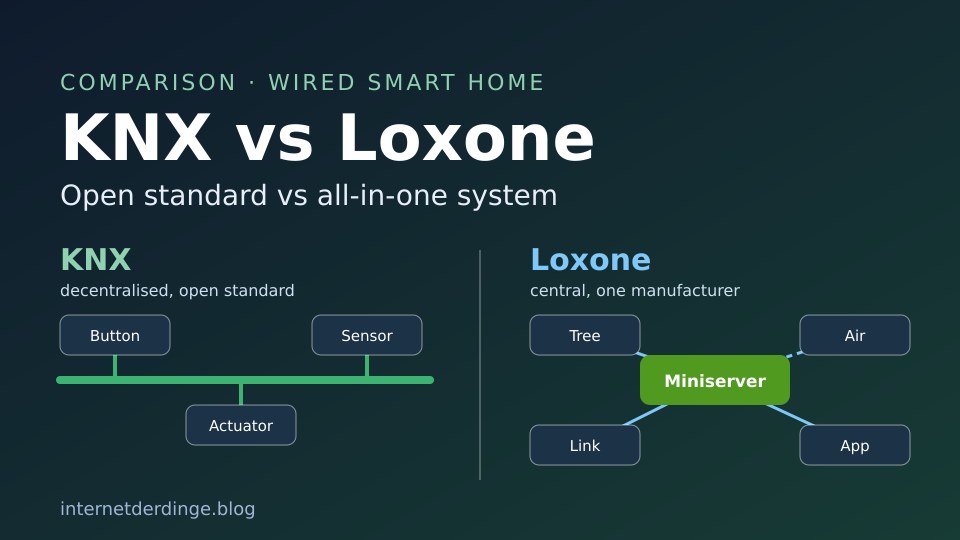
KNX and Loxone are the two names that come up as soon as you plan a wired smart home in a new build. Both switch lights, move blinds and control the heating. Behind them, though, are two very different approaches: KNX is an open standard used by hundreds of manufacturers. Loxone is an all-in-one system from a single company, with the Miniserver at its centre.
This article compares technology, openness, software, installation and costs, based on what the KNX Association and Loxone say. How KNX works in general is covered in our article KNX explained.
KNX vs Loxone: the key differences
- Architecture: KNX is decentralised, the intelligence sits in the individual devices. With Loxone, the Miniserver controls everything centrally.
- Openness: KNX is standardised (EN 50090, ISO/IEC 14543-3). According to the KNX Association, there are more than 8,000 certified products from over 500 manufacturers. Loxone calls itself a proprietary system that is open through interfaces.
- Software: KNX needs the paid ETS software. According to Loxone, Loxone Config is free and licence-free.
- Installation: KNX has certified KNX partners. With Loxone, a Loxone partner handles planning and commissioning, according to the company.
- Combining both: Loxone can integrate KNX through its own extension. You still need ETS, though.
Loxone sells its hardware directly rather than on Amazon, but for KNX you will find this IP interface there, for example:


Last updated on 2026-11-15 / affiliate links / images from the Amazon Product Advertising API. Prices shown may have changed since then. All information without guarantee. * = affiliate link: if you order a product through such a link, we receive a commission from the seller. There are no extra costs for you.
Central or decentralised
KNX has no central control unit. Push buttons, sensors and actuators send their commands to each other directly over the bus. According to the KNX Association, if one device fails, the rest of the installation keeps working. Core functions run locally, without the cloud.
With Loxone, the Miniserver is “the heart” of the project according to the company, and it automates all functions centrally. The operating system and programming are stored on a microSD card inside the Miniserver. Loxone also works locally: according to the company, an installation can run entirely without internet if you want, only services such as remote access via the app are then unavailable.
What if the Miniserver fails? Loxone says larger installations can use several Miniservers, each controlling its own area. If one fails, only its area is affected. If a single sensor or actuator fails, Loxone says this has no effect on the rest of the system. Loxone Config has a wizard for replacing a Miniserver.
Cables and wireless: bus cable vs Tree and Air
KNX usually runs on the green bus cable (KNX TP), a twisted pair with a 30 V bus voltage from its own power supply. The KNX Association sees it mainly for new builds and major renovations. On top of that, there is KNX RF, a sub-GHz wireless option for retrofits, and KNXnet/IP over the network.
Loxone has three technologies of its own:
- Tree: Wired, up to 50 devices and a maximum of 500 metres per Tree branch, laid as a line, star or tree. The Tree cable carries data and the 24 V supply. According to Loxone, the 500 metres only apply to the data line; with lights and dimmers, the possible length is often much shorter because of the voltage drop.
- Air: Wireless in the 868 MHz band (EU) with mesh. Air devices with a fixed power supply forward signals, over a maximum of 5 hops. Each Air interface supports up to 128 devices, and the connection is encrypted with AES 128-bit. There are also battery-powered Air devices for retrofits.
- Link: Connects the Miniserver to up to 30 wired extensions, in a line and up to 500 metres long.
According to Loxone, Air does not support broadcasts, unlike Tree. Several devices are addressed one after another, and with poor reception this delay can be noticeable in some applications.
The current Loxone Miniservers
Loxone’s shop currently lists three models. According to Loxone, all three are compatible with each other and use the same software.
| Model | Interfaces according to Loxone |
|---|---|
| Miniserver | Link, Tree, LAN, 8 digital and 4 analogue inputs, 8 relay outputs, Air via extension |
| Miniserver Compact | Link (switchable to Tree), Tree, Tree Turbo, Air (antenna required), LAN, 4 digital inputs, 2 relay outputs |
| Miniserver Go | Air, Link, LAN, Tree via extension |
According to Loxone, the Miniserver Go usually sits near the router rather than in the distribution board.
Open standard or one manufacturer
This is the biggest difference. KNX is an open standard with publicly available specifications, and no single company controls it. You can combine push buttons from one manufacturer, actuators from a second and presence sensors from a third. According to the KNX Association, new KNX products are backward compatible with older installations.
Loxone makes both the hardware and the software and sells directly, without wholesalers. Loxone itself calls its system “proprietary”, but also says it is open to all systems as long as there is a suitable interface. For this, there are extensions for KNX, Modbus, DMX, DALI, 1-Wire, EnOcean, M-Bus, RS485 and RS232, among others. According to Loxone, its Library offers more than 700 templates for third-party systems.
Worth knowing: Loxone’s terms of sale state that, unless agreed otherwise, Loxone gives no guarantee that its products will work with other products or systems.
Integrating KNX into Loxone
If you want both, Loxone offers the KNX Extension. It connects to the Loxone Link, sits on the DIN rail and needs its own KNX power supply. It handles up to 500 KNX group addresses, which you set up in Loxone Config and use in your programming.
This does not make ETS obsolete. Loxone says itself that addressing and configuring the KNX devices also requires ETS and an external KNX gateway. The first-generation Miniserver could still act as a KNX IP gateway itself; the current one no longer can.
Loxone also names limits: its automatic blinds need full control of the relays, so this function is not available with KNX blind actuators. And for fast colour changes via Tree, Air or DMX, the KNX bus is too slow, according to Loxone.
Software and setup: ETS6 vs Loxone Config
You program KNX devices with ETS6 from the KNX Association. It runs on Windows 10 and 11. The editions according to the KNX shop:
| ETS6 edition | Scope |
|---|---|
| Demo | up to 5 products per project, free |
| Lite | up to 20 devices per project |
| Home | 1 project with up to 64 devices |
| Professional | no limit |
As of 16 November 2026, version 6.4.1. According to the KNX Association, the Home edition is aimed at tech-savvy homeowners who work together with a KNX installer.
According to Loxone, Loxone Config is free and licence-free; it needs Windows 10 (64-bit) or later. The Loxone app is free for iOS, Android, macOS and Windows, with no limit on users. Since version 17.3 there is Config MCP: it lets you connect Claude or ChatGPT to the project, and the AI agent then creates rooms and devices and configures logic. More on this in our article on Loxone’s 2026 launches (in German).
Who plans and installs it?
For KNX, the KNX Association lists certified installers on knx.org, grouped as Silver, Gold and Platinum partners. Certification requires a KNX basic course at an approved training centre, including an exam. A free online course (eCampus) is the starting point.
With Loxone, a Loxone partner handles planning and commissioning, according to the company. To open an account in the Loxone shop, Loxone checks the company’s VAT number and trade licence. So the shop is aimed at professional installers.
For mounting the KNX Extension, Loxone explicitly requires a qualified electrician.
What do KNX and Loxone cost?
A fair price comparison of the two systems does not exist, because the KNX Association does not publish project costs. ETS6 is sold as a paid licence, with only the demo free of charge, while Loxone Config and the Loxone app cost nothing.
Loxone itself publishes a guide value per square metre for a full installation, plus example packages. According to Loxone, these figures only cover the recommended hardware, not planning, installation, extra materials, configuration or aftercare.
According to Loxone, there are no mandatory running fees; the app and remote access are free. The Weather Service and Caller Service are optional paid annual subscriptions. For ETS6, updates up to version 6.4 were free for licence holders, according to the KNX Association.
Apple Home, Matter and Home Assistant
Apple Home: Loxone officially supports HomeKit, including Siri. This needs a current Miniserver or the Miniserver Go, with up to 149 objects per connection. For KNX, the KNX Association mentions integration with Apple HomeKit, Alexa and Google via gateways and partner solutions; more on this in our KNX basics article.
Matter: According to its own blog, Loxone has been a member of the Connectivity Standards Alliance since 2023. The current changelog of Loxone Config 17.3 lists a Matter plugin in version 0.4.1. In 2023, Loxone described its Matter integration as experimental and without support; the changelog does not say anything newer about its status. The KNX Association sees KNX as a stable backbone, with Matter gateways for KNX coming from manufacturers.
Home Assistant: There is an official KNX integration with the top Platinum quality level. It needs a KNX IP interface or KNX IP router and also supports KNX IP Secure. For Loxone, the Home Assistant documentation has no integration page.
Updates and longevity
KNX has existed since 1999, and according to the KNX Association, projects from older ETS versions can be imported into ETS6. Loxone promises free updates; according to the company, even Miniservers bought in 2009 still receive updates today.
New at Loxone: from 1 December 2026, the free Remote Connect service only connects to Miniservers running version 17.2.10.21 or later. After each new release, there are four weeks to update; nothing changes on the local network. On 10 November 2026, Loxone also released a critical security update for the Miniserver with version 17.3.11.10.
KNX vs Loxone comparison table
| KNX | Loxone | |
|---|---|---|
| Type | open standard (EN 50090, ISO/IEC 14543-3) | all-in-one system from one manufacturer |
| Manufacturers | 500+ according to the KNX Association | Loxone, third-party systems via extensions |
| Architecture | decentralised, no central unit needed | central via the Miniserver |
| Wired | KNX TP (bus cable, 30 V) | Tree (data + 24 V), Link for extensions |
| Wireless | KNX RF (sub-GHz) | Air (868 MHz in the EU, mesh) |
| Software | ETS6, Windows, paid licence (demo free) | Loxone Config, Windows, free |
| Installation | certified KNX partners | Loxone partners |
| Home Assistant | official integration | no official integration page |
| Apple Home | via manufacturer gateways | HomeKit official, up to 149 objects |
KNX or Loxone: which suits you?
KNX suits you if you do not want to be tied to one manufacturer and want to mix devices from different brands. For that, you need ETS or an installer who works with it.
Loxone suits you if you want hardware, software and app from a single source and plan with a Loxone partner. The software costs nothing extra, but you are tied to the Loxone range and its interfaces.
You can also combine both: via Loxone’s KNX Extension, but then with ETS and a KNX gateway. You will find all our articles on the topic in our KNX & Loxone section.