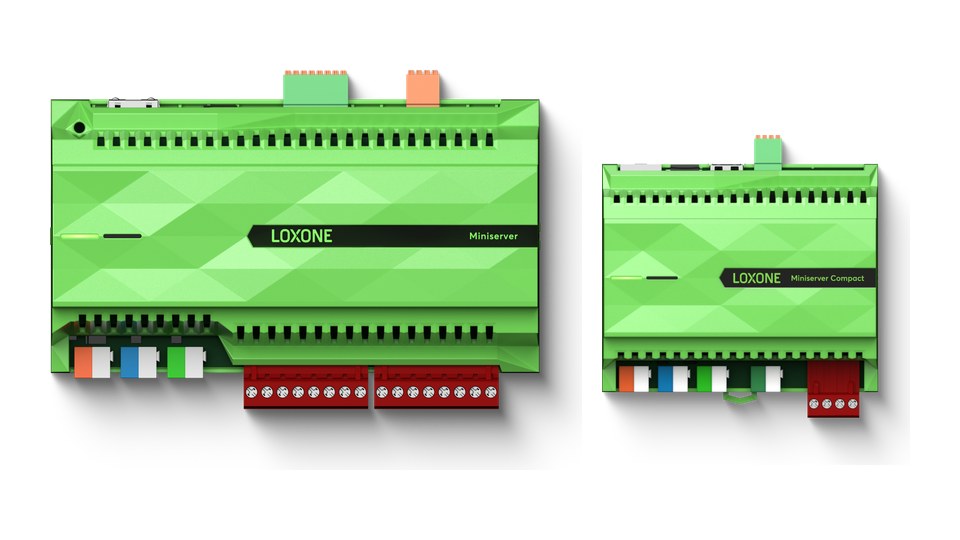
With Loxone, everything runs through one device: the Miniserver. It sits in the distribution board or next to the router and controls lighting, shading, heating and audio. It also connects the switches, sensors and actuators of the building. Without a Miniserver there is no Loxone smart home.
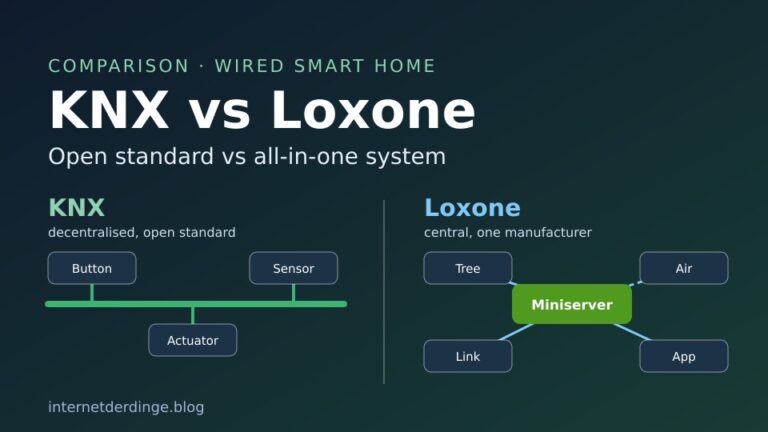
This article covers the current Miniserver models, how Tree, Link and Air work, what you do in Loxone Config and what to know about updates, security and failures. All details come from Loxone. If you want to know how Loxone differs from KNX, read our comparison KNX vs Loxone.
Loxone Miniserver at a glance
- Three models: the Loxone shop currently lists the Miniserver, the Miniserver Compact and the Miniserver Go.
- Central controller: the Miniserver controls every function. Operating system, programming and settings are stored on a microSD card.
- Connections: wired devices connect via Tree, extensions via Link, and wireless devices via Air.
- Software: Loxone Config is free but runs on Windows only. You program with function blocks instead of code.
- Local: according to Loxone, an installation can run entirely without internet if you want. Only services such as remote access are then unavailable.
- Buying: Loxone sells directly to trade businesses. According to the manufacturer, planning and commissioning are done by a Loxone Partner.
Loxone sells the Miniserver directly, not through Amazon. You can still find useful extras there, for example a 24 V DIN rail power supply:


Last updated on 2026-11-17 / affiliate links / images from the Amazon Product Advertising API. Prices shown may have changed since then. All information without guarantee. * = affiliate link: if you order a product through such a link, we receive a commission from the seller. There are no extra costs for you.
What does the Miniserver do?
Loxone calls the Miniserver the heart of every project. Unlike KNX, the logic does not live in the individual devices but centrally in this one unit. A switch reports a button press to the Miniserver, which then decides which light turns on or which blind moves.
Everything the Miniserver needs is on its microSD card: operating system, programming and settings. The card can be swapped, and the Loxone shop sells spare cards with firmware. Loxone Config has its own assistant for replacing a Miniserver.
You operate the system with switches, the Loxone App or the web interface. According to Loxone, up to 63 connections are possible at the same time.
The three current Miniserver models
The Loxone shop currently lists three models. All of them use the same software and work together. None of them has KNX built in, there is a separate extension for that (more below).
| Miniserver | Miniserver Compact | Miniserver Go | |
|---|---|---|---|
| Mounting | DIN rail, 9 modules | DIN rail, 6 modules | free-standing or screw-mounted |
| Power | 19.2 to 30 V DC | 12 to 30 V DC (relays from 19.2 V) | 5 V via micro USB power supply (included) |
| Inputs | 8 digital, 4 analogue (0–10 V) | 4 digital | none |
| Relays | 8 (10 A) | 2 (16 A) | none |
| Tree | yes, up to 50 devices | yes, up to 50 devices, plus Tree Turbo | via extension |
| Link | up to 30 extensions | up to 30 extensions (switchable to Tree) | up to 30 extensions |
| Air | via extension | built in | built in |
| Other | LAN with Modbus TCP | LAN with Modbus TCP, USB, Audioserver function | LAN |
Miniserver: the classic model for the control cabinet, with the most inputs and outputs on the device itself. For relay loads above 5 A, Loxone recommends a coupling relay. Wireless via Air requires the Air Base Extension.
Miniserver Compact: smaller, with built-in Air and Tree Turbo. According to Loxone, Tree Turbo is meant for high-power devices such as speakers and supports up to 10 devices over a maximum of 150 metres. The Compact also includes the Audioserver function and a USB port for music.
Miniserver Go: designed for retrofits. It does not go into the control cabinet, Loxone says it usually sits near the router. It has no inputs or outputs of its own, devices connect via Air or via extensions on the Link.
The Loxone shop no longer lists the older Miniserver Gen 1 as a device, only its spare SD card. Loxone does not support the first generation for Remote Connect or Apple HomeKit.
Tree, Link and Air: how devices connect to the Miniserver
Tree is the wired connection for switches, sensors, lights and actuators. According to Loxone, each Tree branch supports up to 50 devices and a total length of 500 metres. Line, star and tree topologies are possible, but branches must not be connected to each other. For Tree lights and dimmers, the possible length is often much shorter because of voltage drop.
The Tree cable carries data and the 24 V supply, plus a pair of 1.5 mm² wires for devices with higher power needs. Loxone recommends one Tree cable per room from the distribution board, branching off inside the room.
Link connects the Miniserver to its extensions in the distribution board, such as the Tree Extension or the KNX Extension. Up to 30 extensions are possible in a line with a maximum length of 500 metres. The last extension needs a 120-ohm terminating resistor, which comes with the Miniserver.
Air is Loxone’s wireless system. In Europe it uses 868 MHz and builds a mesh: mains-powered Air devices pass signals on, over a maximum of 5 hops. Each Air interface supports up to 128 devices. According to Loxone, the connection is encrypted with AES-128. Battery-powered Air devices are also available for retrofits.
A detail from the Loxone documentation: Air has no broadcasts, devices are addressed one after another in quick succession. The delay is in the millisecond range but can become noticeable with poor reception.
Loxone Config: programming with function blocks
You set up the Miniserver with Loxone Config. The current version is 17.3.11.12. According to Loxone, the software is free, with no subscription or licence fee, and updates are free too. It runs on Windows 10 (64-bit) or later. Loxone does not offer a Mac version.
Instead of writing code, you drag function blocks into your programming. Loxone lists more than 150 of them, for example lighting control, automatic shading, intelligent room control, audio player, burglar alarm and energy manager. According to Loxone, the auto-configuration creates a basic setup for the most important functions within seconds.
You can try Config without any hardware, including simulation and live view. For the building to actually respond, you need the Miniserver. New in version 17.3 is an AI connection: via an MCP server in Config, AI assistants such as Claude or ChatGPT can create rooms and devices and configure logic.
In factory settings, the Miniserver uses admin/admin as login and gets its IP address via DHCP. Config then finds it on the network. Loxone says the first step is to replace the admin password with a strong one.
Loxone App and remote access
The Loxone App is available for Android, iOS and iPadOS, Apple Watch, Wear OS, macOS and Windows. According to Loxone, it is free and can be used by any number of family members.
When you are away, Remote Connect gives you access to the Miniserver without port forwarding on the router. On new Miniservers the service is active from the factory and free of charge. Port forwarding or your own VPN are alternatives.
Important for existing installations: from 1 December 2026, Remote Connect requires at least Miniserver version 17.2.10.21, according to Loxone. After that, you have four weeks to update after each new release. Nothing changes on the local network. If you do without Remote Connect, you need a fixed IP or DynDNS for remote access.
Users, permissions and security
In user management you create users and groups and assign permissions, for example for the app, for Config or for updates. Permissions can be limited to rooms, categories and individual functions, and also by time. Loxone recommends one account per person and time-limited access for maintenance.
Version 17.3 added two-factor authentication, with the code sent by email. There is also an application firewall against scans, password guessing and request floods.
On 10 November 2026, Loxone released a critical security update. Version 17.3.11.10 closes a vulnerability that allowed repeated restarts of the Miniserver to be triggered over the network. Loxone says it found the vulnerability itself and recommends installing the free update immediately. In addition, the web interface cannot be accessed via Remote Connect until further notice. The app and Config keep working via Remote Connect, and everything works as usual on the local network.
Updates and backups
You install updates in Config, in the app (with the right user permission) or by reformatting the SD card. Since Config 17.3.11.12, automatic updates have three options: automatic, after confirmation or never. If you choose never, Loxone turns off Remote Connect and Cloud DNS. Security and feature updates currently cannot be installed separately.
Loxone stresses its long-term support: according to the manufacturer, even Miniservers bought in 2009 still receive free updates today.
One thing you should know: according to Loxone, automatic updates do not create a backup. You create a backup in Config, which copies the data from the Miniserver’s SD card to your PC. When you update via Config, you can also choose beforehand what gets backed up. For automatic backups, Loxone points to its Exosphere service.
What happens if the Miniserver fails?
Because the Miniserver controls everything centrally, this is the obvious question. Loxone describes two mechanisms.
First, an emergency program: if the Miniserver restarts repeatedly, Loxone says it first loads the previous configuration. If the restarts continue, it starts an emergency program. Loxone does not describe what this emergency program does exactly.
Second, multiple Miniservers: with the Gateway-Client setup, up to ten Miniservers can be combined in one project. If one fails, the others keep working according to Loxone, and the failure only affects that area. Loxone recommends this even in a single-family house, for example split by ground floor and upper floor.
If a house runs on a single Miniserver, it is the only controller. If only the internet goes down, the system keeps running according to Loxone, only services such as remote access are missing. During a power cut, the internal clock of the Miniserver and Compact keeps running for 64 hours.
KNX, Modbus, HomeKit and Matter
KNX: with the KNX Extension, the Miniserver can integrate up to 500 KNX group addresses. According to Loxone, you also need the paid ETS software and an external KNX gateway to address and configure the KNX devices, plus a separate KNX power supply. Only the old Miniserver Gen 1 worked as a KNX IP gateway. Our article KNX explained shows how KNX works.
Modbus and other systems: Modbus TCP runs directly over the LAN port of the Miniserver and Compact. The plugin list of Config 17.3 also includes MQTT, EEBUS, OCPP, Gardena, Husqvarna, Home Connect and Miele@home, among others. According to Loxone, the Library adds more than 700 templates for third-party systems.
Hörmann garage door operators, for example, can be connected to Loxone via a Hörmann gateway. It is also available on Amazon:

Last updated on 2026-11-17 / affiliate links / images from the Amazon Product Advertising API. Prices shown may have changed since then. All information without guarantee. * = affiliate link: if you order a product through such a link, we receive a commission from the seller. There are no extra costs for you.
Apple Home: Loxone officially supports HomeKit, including Siri. Each HomeKit connection supports up to 149 objects, and no internet is needed after setup. You need a current Miniserver or the Go, and Auto Update must be enabled.
Matter and Alexa: the plugin list of Config 17.3.11.12 includes a Matter plugin (0.4.1) and an Amazon Alexa plugin (0.4.4). Loxone’s last official statement on Matter dates from 2023: at the time, Loxone called the integration experimental and not recommended for customer installations. Loxone has not said publicly whether this still applies.
Home Assistant: Home Assistant has no official Loxone integration, unlike KNX.
Who sells, plans and installs it?
Loxone sells its hardware directly, not through wholesalers. The shop is aimed at trade businesses: for a shop account, Loxone checks the VAT ID and business registration. Partners can register without a minimum turnover if they work in fields such as electrical installation, IT, heating and air conditioning or solar PV.
According to Loxone, planning and commissioning are done by a Loxone Partner. Mounting the Miniserver and extensions in the distribution board must be done by a qualified electrician in line with the relevant regulations. Loxone offers training courses for this.
You can still try it yourself: Config is free and runs without hardware. That way you can see what the programming looks like before planning anything.
What does a Miniserver system cost?
Loxone lists the Miniserver prices in its shop, the Go is the cheapest model and the Miniserver the most expensive. According to Loxone, the software, app, updates and Remote Connect are free. Paid add-on services include the Weather Service, the Caller Service and Exosphere, each as a subscription. Installation by a partner comes on top of the hardware.
Who is the Loxone Miniserver for?
The Miniserver suits you if you want a smart home from a single source: hardware, software and app from one manufacturer, set up by a Loxone Partner. In new builds, the Miniserver or Compact goes into the distribution board, while the Go with Air is meant for retrofits.
Keep the central role of the device in mind. For more resilience, Loxone recommends several Miniservers working together. And before 1 December 2026, existing installations should be on the required software version so that Remote Connect keeps working.
Read how Loxone compares to KNX in KNX vs Loxone. You will find all articles on the topic in our section KNX & Loxone.