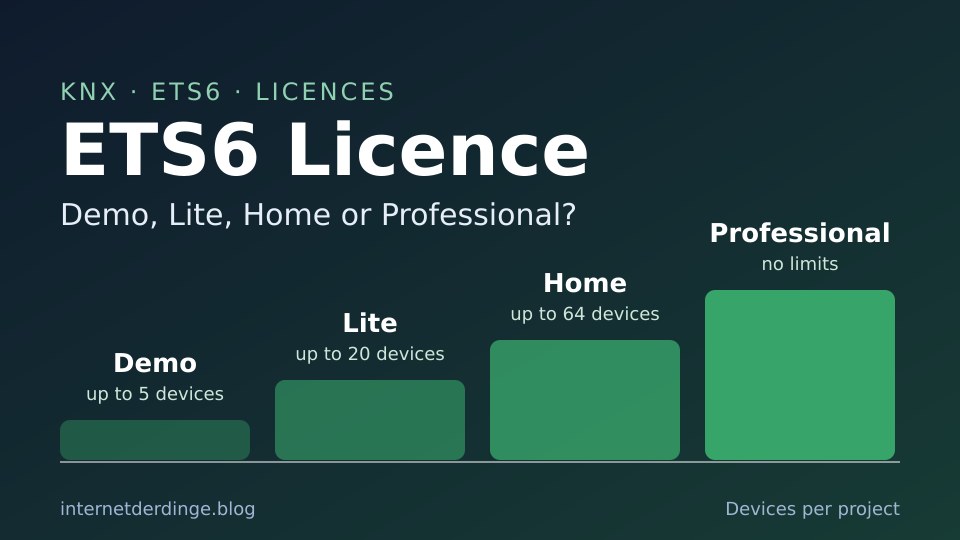
If you want to set up a KNX installation yourself or change it later, you need ETS. The KNX Association’s software comes in four editions: Demo, Lite, Home and Professional. They differ mainly in how many devices and projects you are allowed to create.
This article covers the limits of each licence, how cloud licences and the USB dongle work, and what to check before you buy. It is based on the official MyKNX shop, the KNX Help Center and the KNX Association’s FAQ, as of 21 November 2026. For the basics of KNX itself, see KNX explained.
In short
- There is only one ETS6 setup. Without a licence it runs as a free demo with up to 5 devices per project.
- ETS6 Lite allows any number of projects with up to 20 devices each.
- ETS6 Home allows one project with up to 64 devices.
- ETS6 Professional has no limits.
- All licences are one-time purchases with no subscription. Lite and Home are only available as cloud licences, which need an internet connection.
- Officially only Windows 11 (64-bit) is supported. The KNX Association does not support macOS or Linux.
The four ETS6 editions at a glance
The editions as listed in the official MyKNX shop and the KNX Help Center, where you will also find the current prices:
| Edition | Limit | Licence type |
|---|---|---|
| ETS6 Demo | up to 5 devices per project, no ETS Apps | free, no licence needed |
| ETS6 Lite | any number of projects with up to 20 devices each | cloud only |
| ETS6 Home | one project with up to 64 devices | cloud only |
| ETS6 Professional | no limits | cloud or USB dongle (dongle at extra cost) |
According to the KNX Association, all licences are a one-time purchase with no subscription, monthly fees or maintenance costs. Updates within a version are free, a new major version requires a paid upgrade.
There is no longer a Supplementary edition for ETS6, and ETS Inside was discontinued at the end of 2021.
Lite or Home: which one fits your own home?
The difference between Lite and Home lies in the limits:
- Lite allows any number of projects, but each with no more than 20 devices.
- Home is meant for a single project, but with up to 64 devices.
The easiest way to know how many devices your project has is the planning documents or your electrician’s project file. The shop speaks of “KNX products”, the Help Center of “devices”. We did not find an exact list of which devices count towards the limit in the official documents.
The shop describes ETS6 Home as “intended for private usage”, for technically savvy homeowners working together with a skilled KNX installer. The Help Center, on the other hand, says licences are based on project size, not on private or professional use, and that anyone can order any licence. What matters, then, are the limits: one project, 64 devices.
If you need more later, you can upgrade from Lite to Home, from Lite to Professional and from Home to Professional, and from ETS5 Professional to ETS6 Professional. You start the upgrade in your MyKNX account under “Shop” → “Available Upgrades”. The shop calculates the final price when you order.
Cloud licence or USB dongle
Lite and Home are only available as cloud licences. For Professional, the cloud licence is the default, and a USB dongle is available at extra cost. The differences according to the KNX Help Center:
- A cloud licence needs a stable, continuous internet connection. It does not work behind a proxy server.
- A cloud licence cannot be used on several PCs at the same time. To switch, you release it in the ETS settings under “Licensing” with “Release license” and activate it on the other PC.
- The dongle works fully offline once activated. If it is not plugged in, ETS starts in demo mode.
- You can move from a cloud licence to the dongle, but not back.
The KNX Association is not consistent on whether the dongle can be ordered later: the shop says it has to be added during the order, the Help Center says it can be ordered at any time afterwards. If you want the dongle, it is safest to order it right away.
If you start ETS without internet and without a dongle, it opens in demo mode, according to the KNX Association. There is currently no official offline period for cloud licences.
Free: Demo, KNX Virtual and eCampus
You can try things out without paying:
- ETS6 Demo: the regular ETS6 setup runs as a demo without a licence, with up to 5 devices per project. ETS Apps cannot be used in the demo.
- KNX Virtual: a free simulator that replicates a KNX installation without real hardware. It runs in the cloud only and works with ETS6.
- eCampus: a free online course on KNX and ETS that takes about an hour, according to the KNX Association. If you score at least 85%, you get ETS Lite for 3 months and a voucher for 15% off a new ETS6 licence, valid for 4 months.
There are also promotions from time to time. In September 2026, for example, the KNX Association offered 30% off ETS6 licences and upgrades. That promotion has ended.
System requirements
According to the current system requirements, the KNX Association only supports ETS6 on Windows 11 (64-bit). Support for Windows 10 ended on 15 October 2025. The shop still lists “Windows 10/11” for Lite and Home, but the support page is the one that counts.
- macOS and Linux are not supported.
- Virtual machines and Remote Desktop are “not foreseen”. Using them is at your own risk, without warranty or support from the KNX Association.
- Devices with ARM processors such as the Surface Pro X are not recommended, because ETS only runs there through an emulation layer.
- Minimum: 2 GHz, 4 GB RAM, 20 GB storage, 1024 × 768 pixels. Recommended: 4 cores, 8 GB RAM, 1920 × 1080 pixels.
Buying, downloading and activating
ETS is only sold in the MyKNX shop. You need a MyKNX account, either a personal account or an organisation account.
- Create an account on my.knx.org and order the licence you want. You can pay by credit card, Apple Pay, PayPal (with a 1.8% surcharge, according to KNX) or bank transfer. All orders are prepaid.
- Download the ETS6 setup from your own MyKNX account and install it.
- In ETS, sign in with your KNX ID, select the licence and click “Activate”.
Licences can be transferred to another person. According to the KNX Association this costs a fee once the licence has been activated, and is free as long as it has not been activated yet.
ETS Apps
ETS Apps add extra functions to the software. According to the KNX Association’s FAQ, you need at least ETS6 Lite to use them. Most apps are paid, while manufacturers’ device apps (DCAs) are always free. The app shop includes, for example, the free “ABB Firmware-Update 2.0” and the paid “ABB KNX Space Commissioning – Add 100 devices”.
Since ETS6.4, firmware updates can also be installed directly in ETS without an extra app, as long as the device supports it.
Current version: ETS 6.4.1
The current version is ETS 6.4.1, released on 2 April 2026. Version 6.4.0 arrived on 25 February 2026. According to the KNX Association, it brought multi-linking, automatic backups to the project archive, download via serial number as the default and firmware updates directly in ETS. The update was free for everyone with an ETS6 licence.
ETS5 has not been supported since 31 December 2025. If you still have an ETS5 licence, you can upgrade it to ETS6. Export all your projects first, because the ETS5 licence is replaced during the upgrade.
Working with your electrician
If an electrician sets up the installation and you want to make changes yourself later, this is what the KNX Association says in its ETS6 FAQ:
- Projects move between PCs by export and import. So ask for the project file at handover. More on this in Planning KNX in a new build.
- ETS6 opens projects from all earlier versions back to ETS2.
- An ETS6 project cannot be imported back into ETS5.
The KNX Association does not say whether a large project with more than 64 devices can at least be opened with a Home licence. So it is best to find out how many devices your installation has before you buy.
You also need ETS for KNX with Home Assistant: if you use KNX Secure, the Home Assistant documentation says to export the keyring file from ETS and import it into Home Assistant.
To connect the PC to the bus, ETS needs an interface, for example a KNX IP interface on your home network. One example is the IP interface from Gira:


Last updated on 2026-11-18 / affiliate links / images from the Amazon Product Advertising API. Prices shown may have changed since then. All information without guarantee. * = affiliate link: if you order a product through such a link, we receive a commission from the seller. There are no extra costs for you.
Is there a way without ETS?
Only within a single manufacturer’s system. According to Gira, Gira One is set up entirely with the free Gira Project Assistant, and Hager KNX easy is configured with the Hager Pilot app. Both routes tie you to that manufacturer. There is an overview in the “KNX without ETS” section of KNX explained.
Frequently asked questions
Is ETS6 a subscription? No. According to the KNX Association, all licences are one-time purchases, and updates within ETS6 are free.
Can I program two houses with ETS6 Home? No, Home is meant for one project. For several small projects there is Lite, and only Professional has no limits.
Does ETS6 run on a Mac? Not officially. The KNX Association only supports Windows 11 (64-bit), and virtual machines are not foreseen.
Do I need internet all the time? With a cloud licence, yes. Only the USB dongle for Professional works offline.
Where do I download ETS6? In your own MyKNX account on my.knx.org. Without a licence, the setup runs as a demo.
Conclusion
For a single home, Lite or Home is the choice, depending on the number of devices. Lite covers small installations with up to 20 devices, Home a house with up to 64 devices. If you need more, or want to work offline, you end up with Professional. Before you buy, check the number of devices, have a Windows 11 PC ready and take the free eCampus course, which also gets you a discount voucher.
For more basics, see the comparison KNX vs Loxone and the KNX & Loxone section.